New York · Independent living, informed choices
Medical alert systems for your New York life.
Your apartment. Your favorite walk. Your own daily routine. Compare home and mobile alert options, with clear questions to ask before you choose.
Call (332) 456-5835 for information. Online requests are not active. This is not an emergency line.
Five-borough buying guidesClear questions. No pressure.For you—and the people you trust
Start with the support you want.
A simpler choice starts with a few useful questions.
Help at home
Compare the base connection, wearable button and the rooms you actually use.
Explore this guide →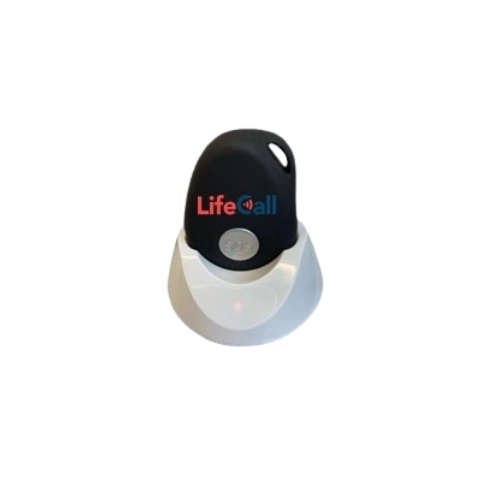
Support on the go
Explore charging, cellular connectivity and location questions for your regular outings.
Explore this guide →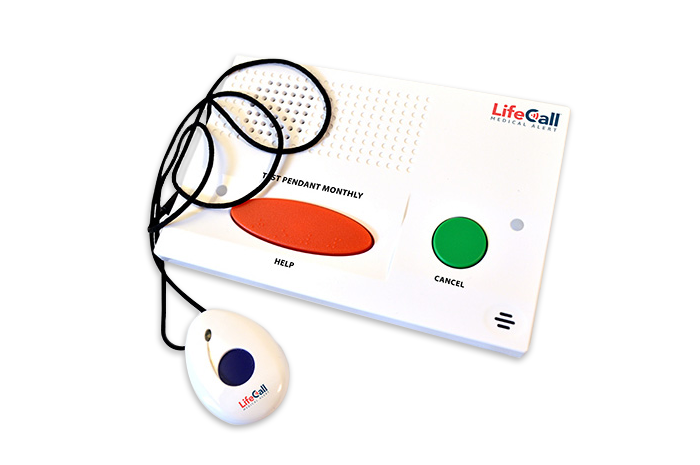
Automatic fall detection
Understand the optional feature, its limitations and the questions to ask before adding it.
Explore this guide →See the different kinds of medical alert systems.
Real LifeCall product photos make the choices easier to picture. Start with home or mobile use, then compare the wearing style and features.
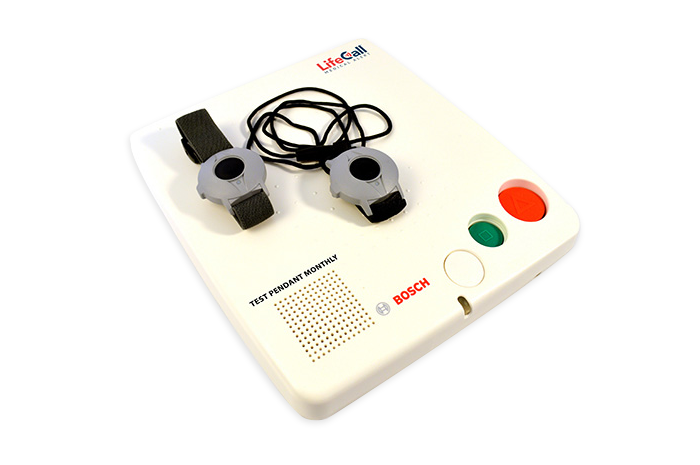
Landline home alert system
LifeCall In-Home System
Manual help buttonA home base with wearable help buttons, intended for use with compatible landline service. A manual help button is not the same feature as automatic fall detection.
What to check: Check your phone-service compatibility and the rooms you use.
Landline home fall-detection system
LifeCall In-Home FallAlert™
Fall-detection pendantA landline-based home system with a FallAlert pendant. The pendant can signal the base when a possible fall is detected; it cannot recognize every fall.
What to check: Ask about wearing position, range checks and false-alert cancellation.
Cellular home alert system
LifeCall In-Home Cellular
FallAlert option availableA stationary home base that uses a cellular connection rather than a traditional landline. LifeCall lists a standard setup and an optional FallAlert button.
What to check: Confirm the connection at your address and which button the quote includes.
Mobile GPS fall-detection device
LifeCall Mobile FallAlert™
Automatic detection listedA portable cellular device with GPS location, a manual help button, two-way voice and automatic fall detection. It is intended for home and outings, subject to a usable connection.
What to check: Compare charging, wearing instructions and the places you normally go.
Medical alert watch
LifeCall MobileAlert Watch™
Confirm automatic-detection featuresA wrist-worn mobile alert with a help button, two-way communication and Wi-Fi/GPS location features. Do not assume every medical alert watch has the same automatic-detection feature.
What to check: Have LifeCall confirm the exact detection capability and plan in writing.
Smartwatch with fall detection
LifeCall Independence Smart Watch
Fall detection listedA smartwatch-style option that LifeCall describes with emergency assistance, fall detection and GPS. Compare its controls, charging routine and agreement separately from the MobileAlert Watch.
What to check: Check the current commitment, return terms and how detection is activated.
Three-in-one home + mobile system
LifeCall MobileAlert Pro™
Optional FallAlert integrationA combined home base, mobile device and wearable-button setup. LifeCall lists FallAlert integration as an option; the bundle name alone does not mean automatic detection is included.
What to check: Ask which pieces and detection options are included in the full quote.
LifeCall manufacturer examples and images. Features are based on the linked product pages, reviewed November 6, 2026. No dealer relationship, local stock or service availability is implied. Confirm the exact model, connection and current terms with the provider. Automatic detection can miss falls. Photo credits.
A practical place to start
Your routine first. The equipment second.
There is no single right setup for every New Yorker. Use the guides to build a short, personal list of questions before speaking with a seller.
For a fall or another emergency, use your established emergency plan. This website does not provide urgent help.
01Start with the life you lead
At home most days, out and about, or a bit of both? Let your routine guide the comparison.
02Try the everyday tasks
Check the help button, speaker and charger. Choose a setup you can comfortably wear and use.
03Compare the complete agreement
Ask for all charges, the actual response process and written trial, cancellation and return terms.
Local life. Specific questions.
From an apartment entrance to a regular outing, explore what to check in your borough.
These are local planning guides, not a promise of provider availability or signal coverage at every address.
Before you decide
Good questions deserve clear answers.
Keep the exact model, connection, wearing routine and written agreement in the same conversation.
See what to compare in a quote →Do I need a landline?
Not necessarily. Ask which connection the proposed system uses. A compatible phone-line base and a cellular-connected system have different requirements; confirm the exact model and the service you have.
Will one system work throughout my apartment?
It needs to be checked in your actual home using the provider’s approved process. Brochure range figures do not establish connection through your particular walls, floors or shared spaces.
Is fall detection included?
It depends on the exact device and plan. Ask whether automatic detection is included and enabled, how it must be worn, and what limitations apply.
Can a family member help me choose?
Yes—start with the wearer’s own preferences, then discuss contacts, charging help and any optional information-sharing tools. Agree on permissions rather than assuming them.
Take your time. Start with the right questions.
Read a practical checklist for your next provider conversation.
Sources & useful reading
Public sources support the factual context. The buying questions are practical suggestions, not a test of any product or property. Reviewed November 7, 2026.


